
iPhone goniometer: Turn your iPhone into a digital goniometer
Reviewed by Kevin Lan, OTR/L, ATP · Updated October 2026
Yes — an iPhone can work as a clinical goniometer, with no extra hardware. The phone's built-in motion sensors measure its orientation relative to gravity, the same principle as the bubble inclinometers long used in clinics. Place the phone against a limb segment, set zero, move the joint, and the change in orientation is the joint angle — a method peer-reviewed research has found as valid and reliable as a universal goniometer.
How an iPhone works as a goniometer
Every iPhone carries an accelerometer and a gyroscope, fused by iOS into a stable estimate of the device's orientation in space. Because gravity is the reference, the phone always knows which way is down — which makes it an inclinometer, the digital successor to the fluid-filled bubble inclinometer of clinical practice. An inclinometer-style goniometer app reads that orientation continuously: zero it with the joint in its starting position, and every degree the limb segment rotates shows up as a degree on screen. There is no camera, no photo to mark up, and no estimating a fulcrum over the joint axis.
That last point is the practical difference from a universal goniometer. A two-arm goniometer asks you to align a fulcrum and two arms over anatomical landmarks by eye while stabilizing the limb — the main source of measurement error in ROM testing. A phone goniometer replaces the eyeballing with a sensor reading: one placement, one hand, an instant reading to the degree.
Is a phone goniometer accurate?
This is the best-studied question in smartphone goniometry, and the answer is consistently yes. A 2019 systematic review of 37 studies found smartphone apps valid and reliable for measuring joint ROM across the upper limb, lower limb, and spine. A controlled bench study found the best inclinometer-style apps agreed with an electronic goniometer within about a degree across the full 0–180° arc (ICC 0.999). Studies against radiographs, surgical navigation, and experienced clinicians reached the same conclusion — in several, the phone was more repeatable than the universal goniometer. The full evidence, study by study, is on the accuracy research page.
How to use your iPhone as a goniometer
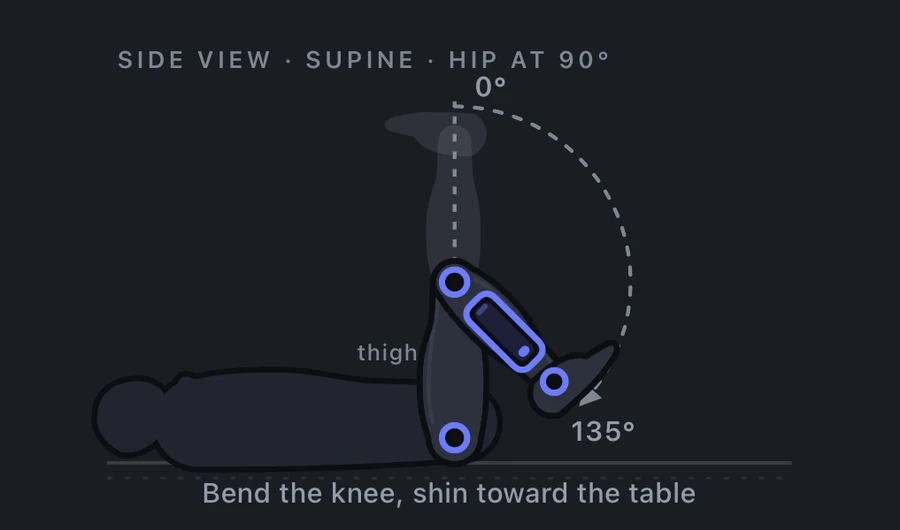
- Choose the movement. Open the app and pick the joint and movement — knee flexion, shoulder abduction, wrist extension. A guided app like Goniometer shows a placement diagram for each of its 55 movements, so the phone goes on the same landmark every time.
- Place the phone flat on the moving segment. Consistent placement is the phone equivalent of consistent landmarking with a universal goniometer — it drives repeatability more than anything else.
- Set zero at the starting position. Zero the reading with the joint in anatomical neutral, not mid-arc, so deficits and hyperextension read correctly.
- Move through the range. Keep the phone against the segment; the reading tracks the joint continuously.
- Lock a steady reading and record it. Wait for the number to stabilize — Goniometer shows a stability indicator, can read the locked angle aloud so your hands stay on the patient, and with Pro locks the reading hands-free — then record the angle with the side, position, and movement.
Technique guides with placement diagrams, AAOS normal values, and reliability evidence are available for every major joint: knee, shoulder, hip, elbow, wrist, hand & fingers, ankle, and cervical spine.
What you need
Just the iPhone already in your pocket. No external sensor, no mount, no calibration target, no account. The Goniometer app for iPhone is free to download and free to measure without limit — guided placement for 55 movements from the cervical spine to individual finger joints, AAOS normal reference values on every screen, and readings you can save to a patient profile. It works offline, and patient data never leaves the device.
iOS goniometer vs. dedicated hardware
Digital goniometers and inclinometers sold as dedicated hardware run from tens to hundreds of dollars and do one thing. A phone goniometer matches their measurement principle — the research above tested phones directly against electronic goniometers and stricter references — while adding what hardware can't: guided placement for each movement, normal ranges beside every reading, saved history with progress charts, and PDF reports. For most OTs, PTs, and students, the instrument question is settled by what's already in your pocket.
Frequently asked questions
Can an iPhone be used as a goniometer?
Yes. The iPhone's accelerometer and gyroscope measure orientation relative to gravity — the same principle as a clinical bubble inclinometer. With a goniometer app, placing the phone against a limb segment and moving the joint yields the joint angle directly, and peer-reviewed research finds the method valid and reliable.
Is there an app to measure range of motion?
Yes — Goniometer: Range of Motion measures joint range of motion with the iPhone's motion sensors: place the phone against the limb, read the live angle, and lock it when steady. It covers 55 movements from the cervical spine to individual finger joints, with guided placement and AAOS normal reference values. Measuring is free and unlimited; readings save to patient profiles and export as PDF or CSV reports, with patient data encrypted on the device.
How accurate is an iPhone goniometer?
A 37-study systematic review found smartphone goniometry valid and reliable, and bench testing found top inclinometer apps within about 1° of an electronic goniometer across 0–180°. Against radiographs and surgical navigation, phone readings matched the traditional instruments — details on the accuracy page.
Is there a free goniometer app for iPhone?
Yes — Goniometer: Range of Motion is free to measure without limit, all 55 movements — plus one saved patient profile and watermarked PDF/CSV export. Goniometer Pro (one-time $19.99, no subscription) adds unlimited profiles, progress history, watermark-free reports on clinic letterhead, and a paste-ready objective note for the EMR.
Do I need any extra hardware?
No. The phone itself is the instrument; the sensors are built in and referenced to gravity.
Is there a goniometer app for iOS and Android?
The principle works on any modern smartphone, and apps exist on both platforms. Goniometer: Range of Motion is built for iOS and is currently iPhone-only, using Apple's fused CoreMotion sensor data for stable readings.
Can I use it for clinical documentation?
Research supports phone goniometry as comparable to the universal goniometer; document the method used and keep positioning consistent between visits. The app is an educational and reference tool, not a medical device, and does not replace clinical judgment.
Your iPhone is the goniometer. Guided placement for 55 movements, neck to fingertips — free to measure. Readings save to patient profiles and export as PDF or CSV reports, and patient data stays encrypted on the device. Download Goniometer on the App Store.

References
- Keogh JWL, Cox A, Anderson S, et al. Reliability and validity of clinically accessible smartphone applications to measure joint range of motion: A systematic review. PLOS ONE. 2019;14(5):e0215806. doi:10.1371/journal.pone.0215806
- Buck C, Martindale B, Braden HJ. Goniometry apps: Do they measure up? Exploring the accuracy of mobile device apps. Gerontology & Geriatrics Studies. 2019;5(2). crimsonpublishers.com/ggs/fulltext/GGS.000610.php
- Dietz MJ, Sprando D, Hanselman AE, Regier MD, Frye BM. Smartphone assessment of knee flexion compared to radiographic standards. Knee. 2017;24(2):224-230. doi:10.1016/j.knee.2016.11.014
- Milanese S, Gordon S, Buettner P, et al. Reliability and concurrent validity of knee angle measurement: Smart phone app versus universal goniometer used by experienced and novice clinicians. Man Ther. 2014;19(6):569-574. doi:10.1016/j.math.2014.05.009
- American Academy of Orthopaedic Surgeons. Joint Motion: Method of Measuring and Recording. Chicago: AAOS; 1965. Normative range-of-motion reference values, as used throughout the Goniometer app.